中文译文
世界地图快捷键
| W,A,S,D/方向键 | 移动视角 |
| 鼠标滚轮向上/Page Up/+ | 放大视野 |
| 鼠标滚轮向下/Page Down/- | 缩小视野 |
| Shift/回车 | 以战团所在位置为中心显示地图,并拉近视角。 |
| 空格键 | 暂停/继续游戏 |
| F5 | 快速保存 |
| F9 | 快速读取 |
| Esc | 打开或退出游戏菜单,关闭当前的城镇、商店或物品栏窗口。 |
| F | 切换足迹追踪显示 |
| T | 扎营/收营 |
| R | 打开/关闭势力与关系窗口 |
| C/I | 打开/关闭物品栏窗口 |
| Alt+F4 | 退出游戏且不保存(适用于“铁人”模式) |
| Ctrl+点击中立队伍 | 攻击佣兵、商队、农民等中立队伍。 必须没有正在进行的委托才能使用。 |
战术地图快捷键
| W,A,S,D/方向键 | 移动视角 |
| 空格键/End | 等待:将当前角色的行动顺序推迟至队列末尾。若无法等待,则结束该角色的行动。(提示:本回合等待,也会使该角色在下一回合更晚行动。) |
| Enter/F | 结束行动:结束当前角色的行动,轮到队列中的下一名角色。 |
| R | 结束回合:让所有己方队员跳过本回合剩余行动,直接进入下一回合。 |
| 1-9 | 启用/取消当前单位的对应技能 |
| Alt | 显示/隐藏生命条:切换所有可见角色头顶的护甲条、生命条和状态效果图标。 |
| Shift | 将镜头移到当前行动的角色。 |
| 鼠标滚轮向上/Page Up | 放大视野 |
| 鼠标滚轮向下/Page Down | 缩小视野 |
| + | 提高镜头层级:提高镜头显示层级,以查看地图上的高处。 |
| - | 降低镜头层级:降低镜头显示层级,隐藏地图上的高处。 |
| C/I | 在己方角色行动时,打开当前角色的物品栏,以更换装备或取用脚下的武器;也可查看其他己方角色。 |
| B | 显示/隐藏不可通行格标记:切换红色覆盖标记,用于显示被树木等环境物体占据、角色无法进入的格子。 |
| T | 显示/隐藏树木:切换地图上的树木及其他大型物体是否可见。 |
物品栏快捷键
| Esc/C/I | 关闭物品栏 |
| 按住Alt并 点击物品 |
在武器铺或铠甲铺修理物品栏中的装备。 |
| Tab/D | 选择队列中的下一名角色 |
| A | 选择队列中的上一名角色 |
| 将角色图标拖到阵型中的位置 | 选中的角色将在战斗开始时站在该阵型位置。若该位置已有角色,两人会交换位置。 |
| 将角色图标拖到预备队位置 | 选中的角色不会参与战斗。若该预备队位置已有角色,两人会交换位置。 |
按键示意图
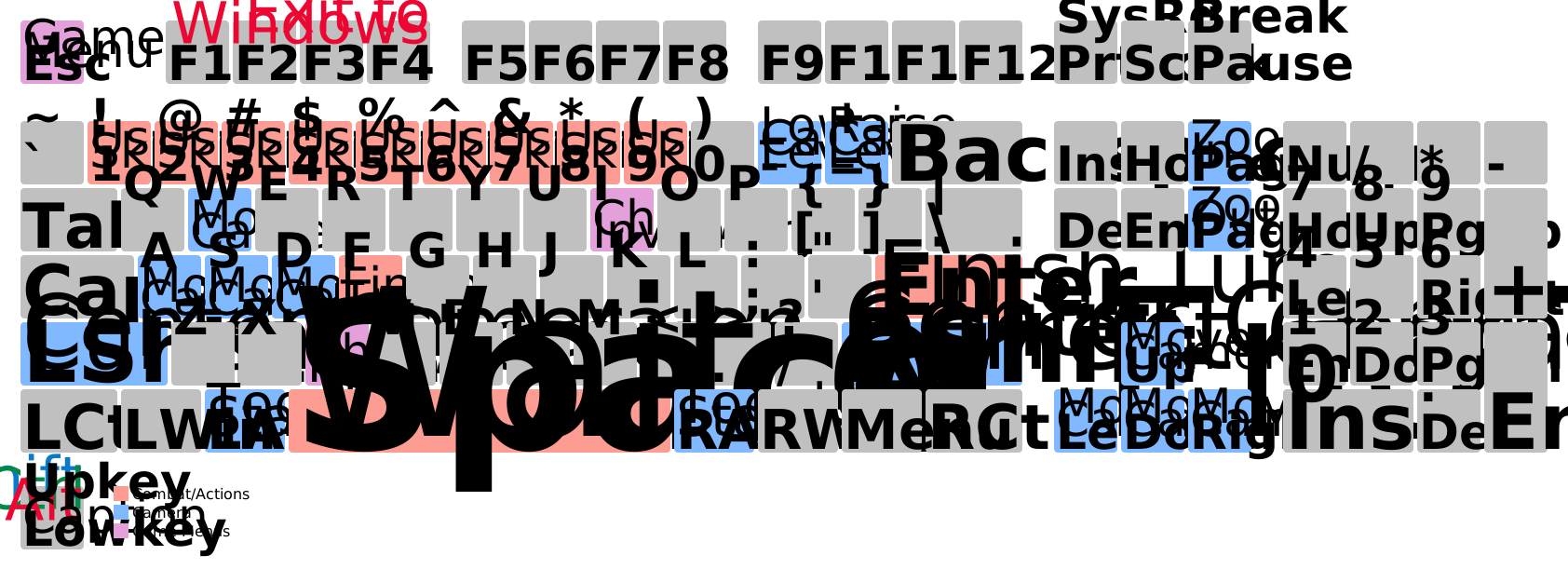

按键示意图:战场兄弟。
英文原文
Global Map Keyboard Shortcuts
| W,A,S,D/arrow keys | Move the camera |
| Mouse Wheel Up/Page Up/+ | Zoom in |
| Mouse Wheel Down/Page Down/- | Zoom out |
| Shift/Return | Center map at and zoom in on Battle Brothers unit |
| Spacebar | Pause/Unpause game |
| F5 | Quick Save |
| F9 | Quick Load |
| Esc | Open game menus/exit menus/close open city/shop/inventory window |
| F | Toggle Tracking Footprints |
| T | Make/Break camp |
| R | Open/Close the Factions & Relations window |
| C/I | Open/Close the Inventory window |
| Alt+F4 | Quit game without saving (For "ironman" mode) |
| Ctrl+Click on a neutral party | Attack neutral parties like mercenaries佣兵, caravans, peasants农民, etc. (Requires you to not have an active contract) |
Tactical Map Keyboard Shortcuts
| W,A,S,D/arrow keys | Move the camera |
| Spacebar/End | Wait Turn: Active character's turn is pushed to the end of the queue. If Wait Turn isn't possible, ends turn for the unit. (Hint: Waiting this turn will also make the character act later next round.) |
| Enter/F | End Turn: End the active character's turn and have the next character in line act. |
| R | End Round: End the current round and have all your men skip their turn until the next round starts. |
| 1-9 | Activate/Deactivate the current unit's respective skills |
| Alt | Show/Hide Hitpoint Bars: Toggle between showing and hiding armor and hitpoint bars, as well as status effect icons, ontop every visible character. |
| Shift | Center the camera on the currently acting character |
| Mouse Wheel Up/Page Up | Zoom in |
| Mouse Wheel Down/Page Down | Zoom out |
| + | Raise camera level: Raise camera level to see the more elevated parts of the map. |
| - | Lower camera level: Lower camera level and hide elevated parts of the map. |
| C/I | On your character's turn, it allows you to open the currently acting character's inventory to switch equipped gear and access weapons on the current tile's ground; and inspect your other characters |
| B | Show/Hide Highlights for Blocked Tiles: Toggle between showing and hiding red overlays that indicate tiles blocked with environmental objects (such as trees) that characters can not move onto. |
| T | Show/Hide Trees: Toggle between showing and hiding trees and other large objects on the map. |
Inventory Keyboard Shortcuts
| Esc/C/I | Close inventory screen |
| Hold Alt and click an item |
Repair item in inventory at a Weaponsmith武器匠 or Armorer制甲师 |
| Tab/D | Select the next character in line |
| A | Select the previous character in line |
| Drag & Drop a Character Icon into a Formation Slot | The selected character will start battles in this position of the formation. If the slot was occupied, the characters will swap places with one another |
| Drag & Drop a Character Icon into a Reserve Slot | The selected character will not take part in battles. If the slot was occupied, the characters will swap places with one another |
Visual Map
Visual map of Battle Brothers战场兄弟 controls.